

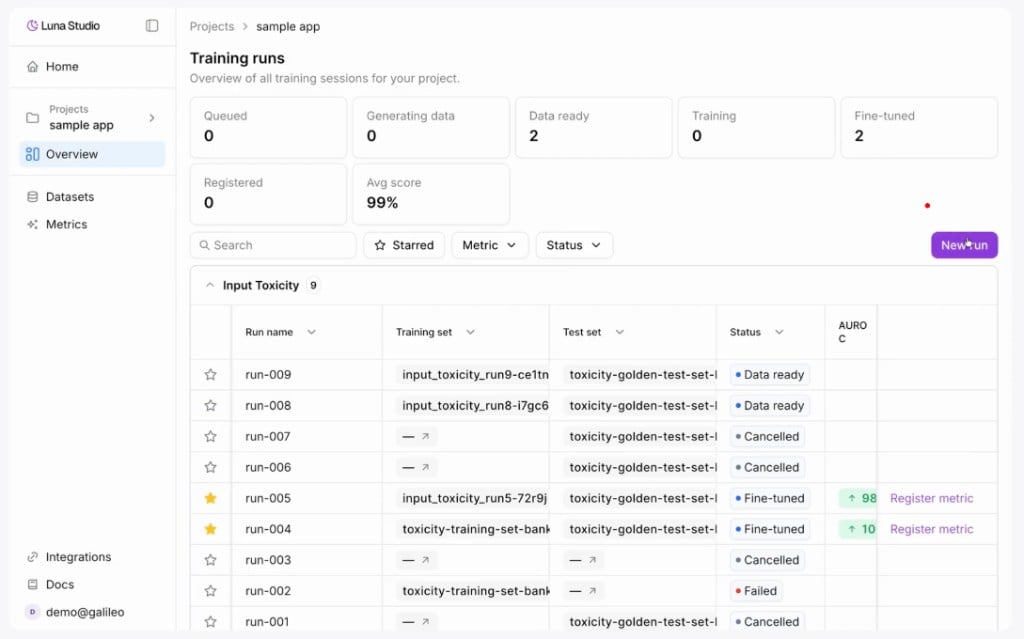
Training runs home for a single project, with status counts and the runs table
Status summary stat cards
Below the page header is a row of stat cards — one per run lifecycle status:
The numbers update live as runs change status.
Filter toolbar
Below the stat cards, the filter toolbar lets you narrow the runs table:Runs table
The runs table has these columns:Star a run
Click the star icon in the leftmost column to mark a run as important. Starred runs stay starred until you click the icon again. Combine with the Starred filter to focus on the runs you’re actively comparing.Empty states
The page shows different copy depending on the filter context:Where to go next
Launch a run
Walk through the four-step run creation flow.
Run lifecycle
The five statuses runs flow through.
Register a metric
Publish a fine-tuned metric to the Galileo metrics store.